By using this site, you agree to the Privacy Policy and Terms of Use.
Accept
NFC LICNFC LICNFC LIC
  • Home
  • Services
    • Govt of India NRI Pension
    • ITR File
    • Retirement Planning
    • SIP Calculator
  • About Us
  • Blog
    • Life Insurance
    • Health Insurance
    • Travel Insurance
    • Auto Loan
    • Car Insurance
    • Credit Card
    • Finance
    • Home Loan
    • Personal Loan
    • Gold Investment
Search
LIC Amritbaal Plan 774: New Plan Introduced on 1 October 2024 | Detailed Analysis
नया बीमा कानून 2025: 100% FDI, IRDAI शक्तियां और पॉलिसीधारकों के लिए नए लाभ – पूरी जानकारी
LIC New Endowment Plan 714 | Reintroduced in October 2024 | Detailed Review with Example in Hindi
Assignment in LIC Policy: Process, Types, Features & Benefits Explained
S&P की नई रैंकिंग में LIC ( 4th ) चौथी सबसे बड़ी वैश्विक जीवन बीमाकर्ता बनकर उभरी है
© 2024 NFC LIC. Insurance Agency. All Rights Reserved.
Reading:How to Check LIC Signature | LIC पॉलिसी में सिग्नेचर कौन सा है पता करें चुटकियों में मोबाइल से
Share
Sign In
NotificationShow More
Font ResizerAa
NFC LICNFC LIC
Font ResizerAa
Search
Have an existing account? Sign In
Follow US
  • Privacy Policy
  • Terms of Use
  • Return & Refund Policy
  • About Us
  • Contact Us
© 2024 NFC LIC. Insurance Agency. All Rights Reserved.
NFC LIC > Life Insurance > How to Check LIC Signature | LIC पॉलिसी में सिग्नेचर कौन सा है पता करें चुटकियों में मोबाइल से
Life Insurance

How to Check LIC Signature | LIC पॉलिसी में सिग्नेचर कौन सा है पता करें चुटकियों में मोबाइल से

NAUSHAD AHMAD
Last updated: May 16, 2024 11:03 pm
NAUSHAD AHMAD
Share
4 Min Read
How to Check LIC Signature
How to Check LIC SignatureImage Source: Google
SHARE

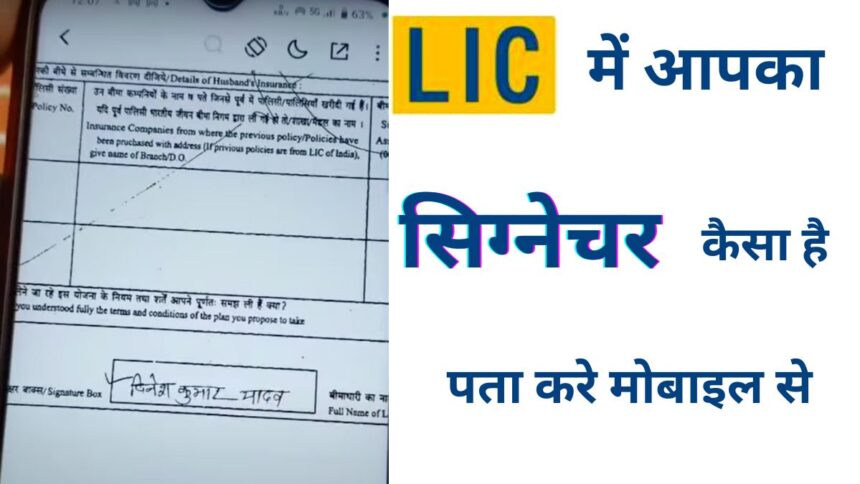
How to Check LIC Signature : While claiming an LIC policy, we often require our signature. However, it is quite common to forget which signature we used when opening our LIC policy, especially considering that these policies are taken for extended periods ranging from 10 to 30 years. So, after such a long time, it is easy to forget which signature we used. Today, I will show you how you can easily check which signature you have used while opening your LIC policy, right from your mobile phone.
Contents
  • To check the signature in your LIC policy, follow these steps:
  • How to Check LIC Signature: Process After Login
  • off, especially for you
How to Check LIC Signature

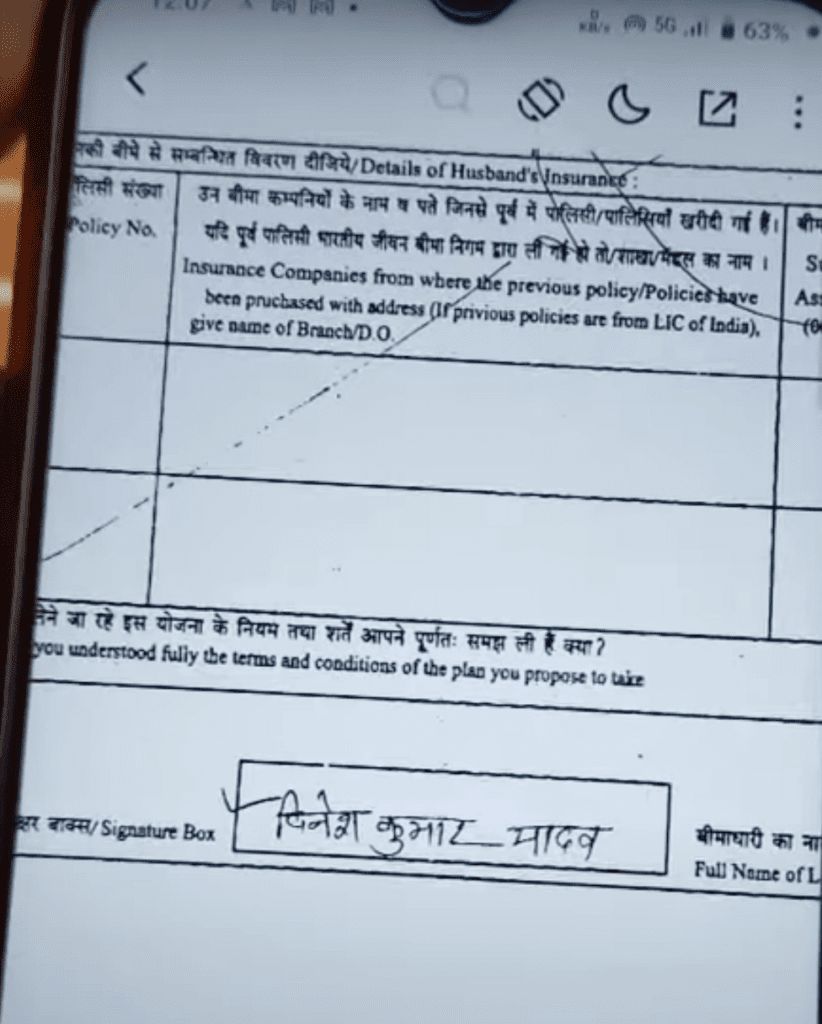
As you can see, this is the full form of the LIC policy, which has been signed as follows. Now, we can not only check the signature, but we can also see other details like the name and address of the agent, as well as the photo provided while taking the LIC policy.

To check the signature in your LIC policy, follow these steps:

1. Download the complete form of your LIC policy on your mobile. To do this, follow the steps mentioned below:
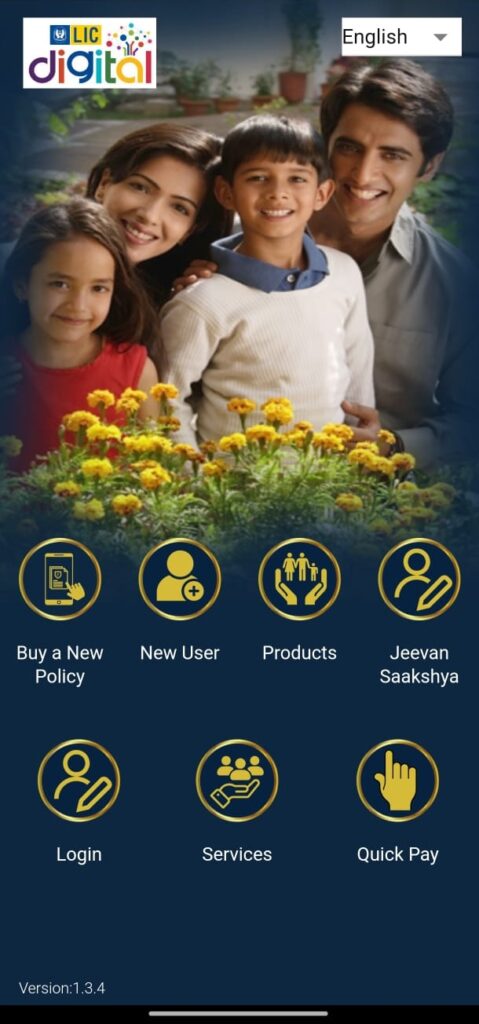
How to Check LIC Signature
  • Download LIC Digital App From Play Store
  • If you are a first-time user then click on New User. Else click on Login.
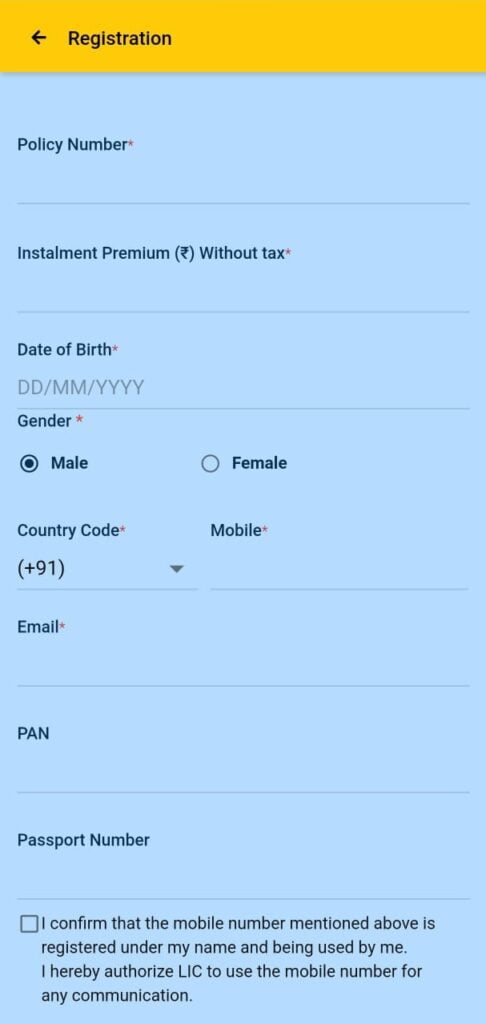
How to Check LIC Signature
  • For New Users, Enter the Policy Number, Installment Premium, DOB, Gender, Mobile, and Email ID.
  • You do not need to enter a PAN or passport number, but you can do so if you wish.
  • Select the I confirm check box and click on Proceed.
  • After this, you will be successfully logged in.
  • In case you face any issue in registration you can share the issue with us in the comment box below or WhatsApp Us on the LIC helpline number 8800290020.
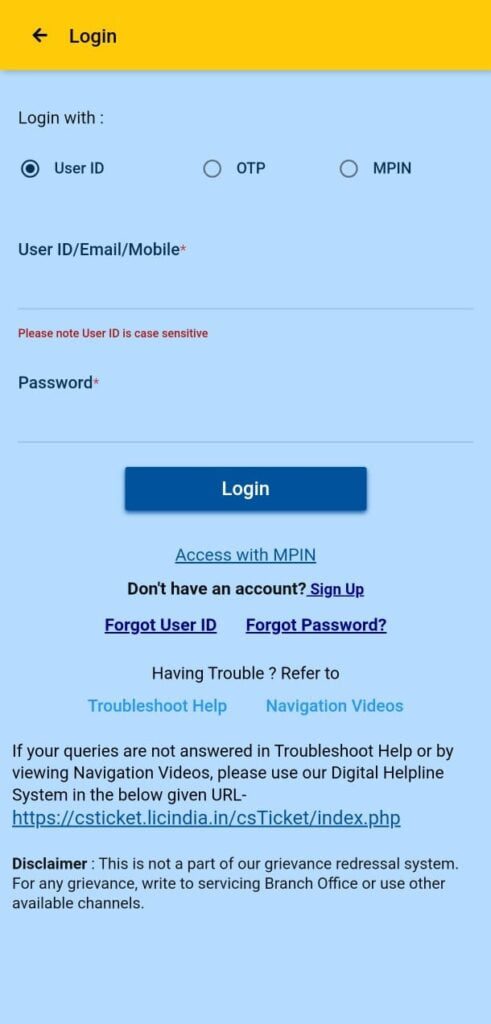
How to Check LIC Signature

For Already Registered Users, they can log in using their User ID Password, OTP on their Registered Mobile Number or By using MPIN.

Once, you are logged in to LIC Digital Application. You will see there are many options on the dashboard, but we are particularly interested in checking your signature within the LIC policy.

How to Check LIC Signature: Process After Login

2. Click on “Premium Services”, where you will find two options: “Policy Claim History” and “Policy Offer Image.” Click on “Policy Proposal Image”.

3. Here, you will find two options: “Policy Image” and “Proposal Image.” Click on “Offer Image”.

4. The policy number will be automatically selected. If you have multiple policies, both will be displayed below. Select the policy you want to check and click “Done”.

5. Now, click on “View”. Wait for a while and you will see the option to download. Click “Download”.

6. After clicking “Continue” your LIC policy paper image will be downloaded and opened on your mobile.

7. Now you can see the complete form of your LIC policy, which includes your signature, name, date of birth, address, agent name, nominee name and more. By following these simple steps, you can easily check which signature you have used without any hassle.

I hope you found this information useful. If you liked this post then please subscribe to our newsletter and follow us on Google News.

10%

off, especially for you🎁

Sign up to receive your exclusive discount, and keep up to date on our latest products & offers!

We don’t spam! Read our privacy policy for more info.

Check your inbox or spam folder to confirm your subscription.

📘Facebook✖️Twitter💼Linkedin💬Whatsapp✈️Telegram👽Reddit📌Pinterest🦋Bluesky🐘Mastodon📓Tumblr🎮Discord
TAGGED:How to Check LIC Signatureliclic policy signature checklic signlic signature

🚀 Get Free Money, Insurance & Investment Tips

Join thousands of readers receiving expert financial insights, LIC updates, tax-saving tips, and important news—delivered free to your inbox.

By signing up, you agree to our Terms of Use and acknowledge the data practices in our Privacy Policy. You may unsubscribe at any time.
Share This Article
FacebookPinterestWhatsappWhatsappLinkedInTelegram
Share
Previous ArticleKangana Ranaut PropertyLok Sabha Election 2024: कंगना रनौत के पास 50 LIC POLICIES? | Kangana Ranaut Property | Hindi News
Next ArticleLIC New Fixed Deposit SchemeLIC का नया Fixed Deposit प्लान: बेहतर निवेश के लिए एक शानदार विकल्प
Leave a CommentLeave a Comment

Leave a Reply Cancel reply

Your email address will not be published.Required fields are marked *

Stay Connected

235.3KFollowersLike
69.1KFollowersFollow
11.6KFollowersPin
56.4KFollowersFollow
136KSubscribersSubscribe
22.4KFollowersFollow
4.4KFollowersFollow
- Advertisement -
Ad imageAd image

Latest News

RBI Home Loan Insurance Bundling Rules
RBI Home Loan Insurance Bundling Rules: 5 Must-Knows
Home LoanFinanceLife Insurance
3 days ago
Group Health Insurance vs Individual Health Insurance
Group Health Insurance vs Individual: 7 Costly Gaps
Health Insurance
6 days ago
Bima Sugam 2026
Bima Sugam 2026: 7 Things HNIs & NRIs Must Know
Life InsuranceCar InsuranceFinanceHealth InsuranceTravel Insurance
2 weeks ago
ITR Filing 2026 for NRIs
ITR Filing 2026 for NRIs: New Tax Act & Deadlines
Finance
2 weeks ago

You Might also Like

Assignment in LIC Policy
Life Insurance

Assignment in LIC Policy: Process, Types, Features & Benefits Explained

NAUSHAD AHMAD
By
NAUSHAD AHMAD
2 years ago
LIC में 5 बड़े बदलाव
Life Insurance

LIC में 5 बड़े बदलाव | LIC AGENTS के COMMISSION में भारी कटौती! LIC और AGENTS को बड़े नुकसान की आशंका

NAUSHAD AHMAD
By
NAUSHAD AHMAD
2 years ago
LIC Fixed Deposit Plan 2026
FinanceLife Insurance

LIC Fixed Deposit Plan 2026: Interest Rates for 5, 10, 15 & 20 Years Explained

NAUSHAD AHMAD
By
NAUSHAD AHMAD
2 weeks ago
How to get GST exemption in NRI's Life Insurance Premium
Life Insurance

How to get GST exemption in NRI’s Life Insurance Premium

NAUSHAD AHMAD
By
NAUSHAD AHMAD
2 years ago
Show More
NFC LICNFC LIC
Follow US
© 2024 NFC LIC. Insurance Agency. All Rights Reserved.
  • Privacy Policy
  • Terms of Use
  • Return & Refund Policy
  • About Us
  • Contact Us
NFC LIC Free News Letter SignUp Banner
🚀 Get Free Money, Insurance & Investment Tips
Join thousands of readers receiving expert financial insights, LIC updates, tax-saving tips, and important news—delivered free to your inbox.

Zero spam, Unsubscribe at any time.
login
Welcome Back!

Sign in to your account

Username or Email Address
Password

Lost your password?

Not a member? Sign Up